


Course override instructions
October 18, 2022
Course Overrides and Error Messages.
It is always worth the effort to ask for an override for a course you need.
Common Error messages in Banner 9:
- “Closed Section.” The section is full so you need to rework your plan, ex. course times. Remove that time and search for another. If there is no other, add to the Banner 9 waitlist or request a capacity override from the department offering the course.
- ”This is a linked lecture/lab course; you must add the corresponding lecture/lab section.” – you have added part of a linked lecture and lab – you need both a lecture section and a lab section to add the class to your schedule.
- “Prerequisite and Test Score.” If you have taken the pre-req course from another institution, it may not be on your transcript or it may be a substituted course and you need an override from the department offering the course.
- “Field of Study Restriction – Major” – This section is restricted to a major that you are not classified as. Does another section fit your schedule? If so, select that one. If not, you can request a major restriction override from the department offering the course.
- “Campus Restriction” – This section is restricted to a campus that you are not classified as. Does another section fit your schedule? If so, select that one. If not, you can request a campus restriction override from the department offering the course. Note, mixing campuses is not advised for financial reasons, you will likely see a large increase in tuition when mixing campuses.
- “Repeat course” – You have taken a course before and wish to retake. Request a repeat override from the department offering the course.
Most Common Types of Overrides:
- Class Capacity – The seats available in Banner are 0 (zero). Most campus classes have moved to Banner 9 waitlists in lieu of capacity overrides. We recommend watching the video about waitlists to see that process. If you do not see the waitlist open, then you may use the eForm.
- Pre-requisite – you have taken the pre-req course but it is not in your MSU Banner transcript or was a substituted course (ex. Calculus that was 4 credit hours instead of 3)
- Repeat – You have taken a course before and wish to retake the course.
NEW! Undergraduate Overrides:
Undergraduates can now request course overrides during registration via a standardized eForm in myState!
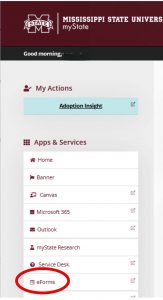 Directions:
1. If you receive an error, see if an override request is appropriate for the situation.
Reminder: Registration errors are displayed on the Banner 9 registration screen, top right, when you are attempting to add course. If the course has a waitlist option in Banner for a capacity concern, add to the waitlist instead of doing an eform.
2. In myState, select the eForm on the left-hand side. Then select the override request option.
3. Information Needed:
– Type(s) of override needed (prerequisite, major, class capacity, campus, etc.) for a specific section of a course Example: MKT 3013-01 Course code = 3013; Section = 01
– Enter a reason the override is needed.
– If asking for a Campus 5 course, you will need to acknowledge additional fees are associated with the courses.
4. Submit
ATTENTION: This is NOT an automatic process and approval. It will be routed to the department for evaluation. You will be notified if given permission or if denied. The notification will go to your MSU email account. If an override is granted, it is recommended that you update your schedule as soon as possible, as unused overrides may be removed if they are not used in a timely manner.
Banner 9 Waitlist:
Instead of capacity override requests, you may have courses that use the Banner waitlist. The Banner waitlist is used for many classes on campus.
Watch the video below to learn the additional steps to adding yourself to the waitlist. For all other override requests see link above for department contacts.
For a video demonstration of how to join the waitlist for a section, click this link!
- If a seat becomes available, then the first student on the waitlist will receive an email from MSU’s Registrar’s Office stating you can add the course within 24 hours. This time limit will be shortened as we approach the first week of class.
- This process is handled automatically by Banner 9 registration. You will not need to contact the instructor, department, or college office about a waitlist.
- A student may be enrolled in one section and on the waitlist for one other section of the same course. After receiving a notification to add the waitlisted section, the student must first drop the original section before adding the new one.
Previous Override Information Prior to the Override eForm:
How to request an override:
Contact the department that owns the course (see below)
If emailing, include the following information:
Your NetID/MSU ID (ex. hp1999, 903464133)
Course Information (ex. EM 2413 01 Eng. Mechanics I *** remember to include section number(s)
Type of Override needed (ex. Pre-req override)
Term (Winter or Spring, Summer or Fall)
Contacts for common departments: links will be updated as received.
For ECE overrides, please use this form.
Aerospace Engineering includes EM requests
send any justification (pre-req credit information to override@ae.msstate.edu)
students are strongly encouraged to take the face-to-face sections. The 501 sections are intended for students co-oping or will be a
distance student. Each request for the 501 section will be reviewed individual and require additional justification before approval.
Math (MA) -email office@math.msstate.edu for overrides relating to, pre-requisite, repeat, and campus… for capacity overrides please email override@math.msstate.edu
Physics (PH) – Email Tracy Wilcox (tld25@msstate.edu)
Contacts for other disciplines are linked here.
Please also note, that the processing of overrides is a manual one. It may take some time. You can follow up on a request after an appropriate wait time. For example, I typically don’t process overrides until I get a large batch of them for a particular class.