


AP Credits
AP credits will be applied once received by The College Board. They are added to students’ transcripts through The Registrar’s Office. July is a heavy processing time, but they are added to transcripts prior to the fall so students can make needed adjustments to schedules.
AP credits on the transcript activate any needed prerequisites.
You will not be able to add sequential courses until the credits are on your academic records or unless a prerequisite override is granted from the department to you.
Steps for Students:
- Check throughout July and August in Banner to see when they are added to your transcript.
You will not be notified when they are added. - Verify credits are on your transcript in your academic records. See below on using an eform in Banner for a prerequisite override if the department is allowing students to request overrides.
- Change your schedule as needed:
-
- Drop course that was given AP credit.
- Add the sequential course or a different course after verifying it has seats and that it works with your schedule.
- If the course you need is full, you may be able to add to a Banner waitlist by using the drop-down box in the registration summary to change to “waitlist.” Remember that you will be notified via email to go back in and add the course if a seat opens for you. You can also continue watching the course for seat availability, or you can add another course for your major to your schedule to maintain full time enrollment (12-16 hours). Some departments also use eforms for capacity overrides instead of the waitlist option.
-
Troubleshooting and FAQs:
How do I see if my credit has been uploaded?
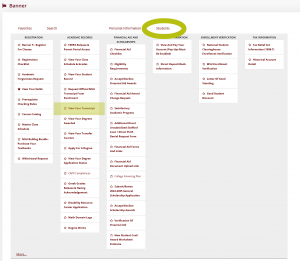
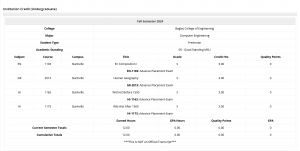
myState (my.msstate.edu) > Banner > Academic Records > View Your Transcript
It will look something like this —
Can I use the myState/Banner eform for prerequisites and capacity overrides?
If you have access to the eform and a department is granting prerequisite overrides via the eform, you may submit a form asking for a prerequisite override. All overrides must be secured by the student from the department. Advisors do not secure overrides or complete schedule changes past Orientation.
Be sure to include a screenshot and details of your AP score to request in the notes a prerequisite override for the next class level.
Here are directions on the eform.
Not sure how to add and drop classes via Banner?
Watch a how-to video. Remember to refine your search to Starkville campus only.
How do I add to the waitlist if it is an option?
Watch this video.
What score do I need to make?
Visit the MSU catalog.
What is a class I can take?
Look at your major’s flowchart for your options:
—EE flowchart
—CPE flowchart
What are the General Education options for Fine Arts, Humanity, and Social Science?
Visit the MSU catalog.
What is MSU’s College Board test code?
It is 1480, and scores must be sent by The College Board.
I received my scores, but I do not see them on my transcript. What do I do?
If they were sent by The College Board to MSU, the scores may be in processing. The heavy number of scores coming in will take time to process.